
监测网页内容更新
您的赛博小钻风已上线
情景
日常工作中经常碰到需要在网络上采集一些外部公开数据的时候,但是要采集的网页却并不是定期按时发布的,这就得时不时的打开这些网页看下有没有新的更新内容。虽然有办法能在一个标签页面一次打开多个页面提高检查的效率(参考文章:HTML如何嵌套多个网页),但是这种不确定性的更新频率还是挺让人抓马的。
这时要是能有个工具每天帮我定时检查这些网页内容有没有更新就好了,有更新就发邮件通知我,没有更新则继续静默监控,整个赛博小钻风岂不就省事多了。说干就干,下面就写个监控脚本工具。
思路
工具技术简介:python3,requests,lxml,re,difflib,yagmail
梳理下代码逻辑。要获取指定网页块内容,需要有网页地址url,其次还要通过开发工具确定好目标内容的路径xpath,过滤筛选逻辑用的正则表达式re,缓存文件的路径位置等信息。根据以上信息,处理后得到当天最新的内容,对比历史缓存的内容,如果网页有更新,输出新增的内容,整合所有网页里更新的内容到一起,再通过发送邮件提醒。如果网页都没更新,给个暂未更新得标志,方便后续中断程序。
逻辑梳理完毕,下面就是示例和代码,这次拿海口美兰机场的运营数据举例。
示例网页截图
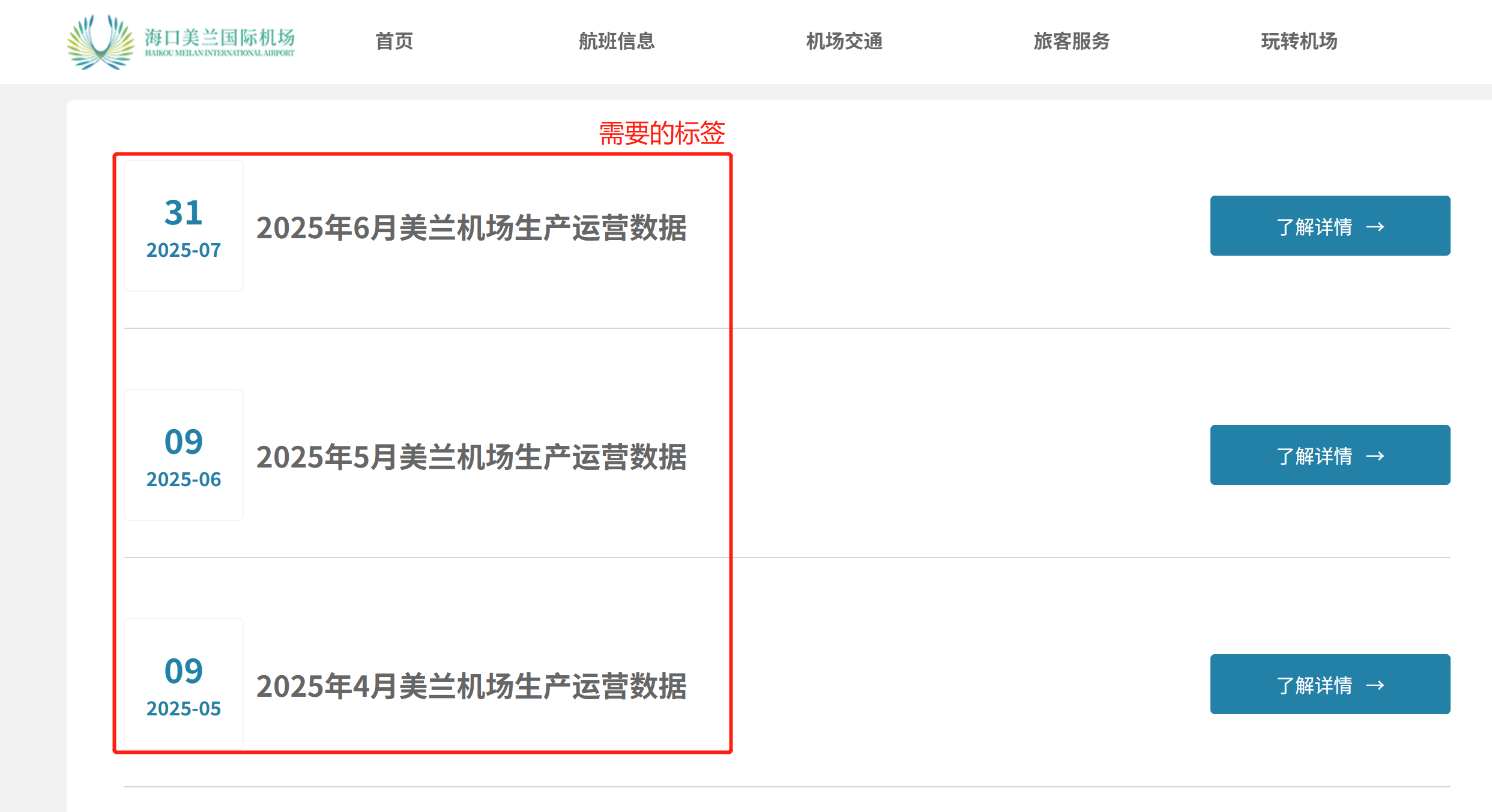
网页内容信息示例
<div id="item" class="btlb">

          <div class="wtlb_block6 flex-row">
              <div class="wtlb_group2 flex-col">
                  <span class="wtlb_word13">
                      2025年11月美兰机场生产运营数据
                  </span>
              </div>
          </div>
          <div class="wtlb_block6 flex-row">
              ...
          </div>
需要记录的内容,就是’.wtlb_word13'类别的span标签。xpath语法定位到父级div标签,//*[@id="item"],在通过re获取全部目标内容。
实现
抓取和对比过程的代码共同封装为一个通用类webContentChecker,方便后续复用。模块包含抓取、清洗、对比、保存、输出一整个流程,适用于大多数的静态页面,也为拓展类提供可继承的通用方法。
xclass WebContentChecker:
def __init__(self, url, xpath, cache_file,filter_re = None):
'''Param:
* url: 指定网页地址;
* xpath: 指定需要部分的xpath路径;如//*[@id="iframediv"]/div[1]。
* cache_file: 指定缓存文件的存储路径;
* filter_re:默认None,可设置re选择指定格式内容;'''
self.url = url
self.xpath = xpath
self.cache_file = cache_file
self.filter_re = filter_re
self.headers = {
'Accept': 'text/html,application/xhtml+xml,application/xml;q=0.9,image/avif,image/webp,image/apng,*/*;q=0.8,application/signed-exchange;v=b3;q=0.7',
'Accept-Language': 'zh-CN,zh;q=0.9',
'Cache-Control': 'max-age=0',
'Connection': 'keep-alive',
'User-Agent': 'Mozilla/5.0 (Windows NT 10.0; Win64; x64) AppleWebKit/537.36 (KHTML, like Gecko) Chrome/136.0.0.0 Safari/537.36'
} #通用模拟请求头
#获取网页内容
def fetch_content(self):
response = requests.get(self.url, timeout=20,headers = self.headers)
response.encoding = response.apparent_encoding
tree = html.fromstring(response.text)
elements = tree.xpath(self.xpath)
content = elements[0].text_content().strip() if elements else ''
content = re.sub(r"\s+","
",content)
if self.filter_re:
content = re.findall(self.filter_re, content,flags = re.M)
content = '
'.join(content) if content else ''
return content
#获取缓存文件内容
def get_cached_content(self):
if not os.path.exists(self.cache_file):
return ''
with open(self.cache_file, 'r+', encoding='utf-8') as f:
return f.read()
#保存网页内容到缓存文件
def save_content(self, content):
with open(self.cache_file, 'w+', encoding='utf-8') as f:
f.write(content)
#获取网页内容的差异
def get_diff(self, old, new):
old_lines = old.splitlines()
new_lines = new.splitlines()
diff = difflib.unified_diff(old_lines, new_lines, lineterm='')
added_lines = [line[1:] for line in diff if line.startswith('+') and not line.startswith('+++')]
return '
'.join(added_lines).strip()
#得到新增内容
def check_and_notify(self):
try:
new_content = self.fetch_content()
old_content = self.get_cached_content()
diff = self.get_diff(old_content, new_content)
if diff:
self.save_content(new_content)
print(f"{time.strftime('%Y-%m-%d %X', time.localtime())}:{self.cache_file} 内容已更新;")
return diff
else:
return 0
except Exception as e:
print(f"{self.cache_file},{self.url}, Error: {e}")
剩余部分代码主要完成基础变量设置和邮件发送环节即可。
xxxxxxxxxx
import os,re,time
import requests,difflib,yagmail
from lxml import html
#基本变量
f,_ = os.path.split(__file__)
tday = time.strftime('%Y-%m-%d',time.localtime())
#获取内容相关变量字典
dic = {
'name': "apt_HAK_monthly", # task name
'url': "http://www.mlairport.com/mljc/scyysj/",
'xpath': '//*[@id="item"]',
'cache_file': "cached_apt_HAK.txt",
'filter_re': '^.+生产运营数据$',
}
rltls = [] #保留新增结果
name,url,xpath,cache_file,filter_re = dic['name'],dic['url'],dic['xpath'],os.path.join(f,dic['cache_file']),dic.get('filter_re')
#创建网页检查对象
net_cc = WebContentChecker(url, xpath, cache_file,filter_re)
new_content = net_cc.check_and_notify() #新增内容
if new_content:
rltls.append(f"{name} has some new:
{new_content}")
#有新增时,发邮件
if len(rltls) > 0:
e_subject = f"Official data update, attention! {tday}"
e_contents = "
".join(rltls)
with yagmail.SMTP(user = '123@qq.com',password = 'root',host = "smtp.exmail.qq.com",port = 465,smtp_ssl = True) as yag:
yag.send(to = '123@qq.com',subject = e_subject,contents = e_contents)
else:
print(f"{tday} There is no new content in these websites.")
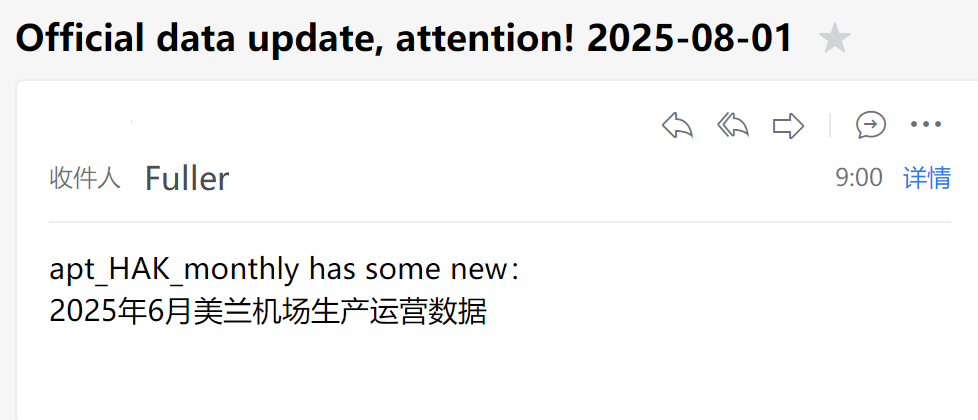
将代码保存为py脚本,定时运行即可实现监测网页的功能,您的赛博小钻风上线。
提醒邮件截图
总结
目前WebContentChecker类只适合监测简单的静态内容网页,对于使用了API形式返回的动态内容,还需要新增自定义处理方法,不过API的情况就更加复杂且多元,返回的内容也千变万化,基本上没有统一的适用逻辑,当然可以考虑引入LLM大模型处理接口返回内容格式。除了获取层面,其它邮件提醒的基本框架、缓存文件、对比检查环节的判断方法这些都是通用的。
